

Not long ago, AI coding assistants were glorified autocomplete tools. They were helpful for recalling syntax or generating boilerplate code, but they fundamentally required developers to do the heavy lifting of architectural planning, debugging, and cross-file navigation.
Today, the landscape has radically shifted. The industry has entered the era of “agentic” software development. Modern AI coding applications do not just predict the next line of code; they index entire repositories, execute terminal commands, run automated test suites, and autonomously correct their own errors.
Crucially, these applications do not exist in a vacuum. A tool's power is heavily defined by how seamlessly it integrates into a developer's broader ecosystem, including Git version control, continuous integration (CI/CD) pipelines, cloud hosting, and external knowledge bases. Furthermore, choosing the right application requires balancing monthly subscription costs against strict corporate data privacy rules.
A prime example of this fast-moving market occurred on June 2, 2026, when Cognition officially acquired Codeium and rebranded the popular Windsurf IDE into Devin Desktop. This over-the-air update fundamentally swapped the old Cascade agent engine for a Rust-backed “Devin Local” agent, restructuring how the environment operates alongside other tools.
Here is the complete, multi-dimensional breakdown of the top five applications dominating the field.
At-a-Glance Pricing & Privacy Matrix
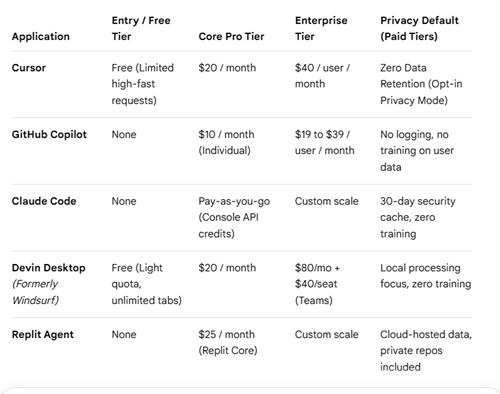
As of June 30th 2026

1. Cursor
The Golden Standard for AI-Native IDEs
For developers seeking a seamless transition into AI-first coding, Cursor is the current market favorite. Built as a direct fork of VS Code, it preserves the development environment engineers already know while embedding AI throughout the coding workflow.
Ecosystem Integration: Cursor integrates deeply with local Git and terminal environments. When making sweeping multi-file changes, Cursor automatically groups edits so you can review them as a staged diff before committing them to GitHub. It also features a “Docs” indexing tool, allowing you to paste a URL to any third-party library documentation (like React, Tailwind or LangChain). Cursor crawls, indexes, and syncs that documentation locally, enabling the AI to write accurate code using the absolute latest API versions.
Pricing Models: Cursor offers a robust Free Tier with limited high-fast model requests. The Pro Tier sits at $20 per month, offering unlimited slow requests and a generous quota of high-speed premium model usage. The Business Tier costs $40 per user per month, introducing centralized billing and advanced team administration controls.
Data Privacy Considerations: Cursor features a strict, opt-in “Privacy Mode.“ When toggled on, none of your code snippets, prompt history, or repository indexes are stored on Cursor servers or used to train future AI models. It complies with modern enterprise security expectations by processing data transiently in memory.
Best For: Professional full-stack engineers who want a polished, highly customizable visual environment that maximizes contextual awareness.
2. GitHub Copilot
The Corporate Powerhouse
As an early pioneer in the space, GitHub Copilot remains a dominant force, particularly within mid-to-large-scale enterprises. Backed by Microsoft, its core strength lies in its unmatched corporate infrastructure, compliance guardrails, and native placement within the broader GitHub universe.
Ecosystem Integration: Copilot offers the tightest ecosystem integration on the market because it is built natively into GitHub. Beyond the code editor, it extends directly into your pull requests (PRs). Copilot can automatically generate detailed PR descriptions, perform automated code reviews, flag security vulnerabilities before code is merged, and suggest automated fixes directly inside the GitHub web interface. It also pairs perfectly with GitHub Actions to streamline continuous integration pipelines.
Pricing Models: GitHub Copilot Individual costs $10 per month or $100 annually. Copilot Business scales to $19 per user per month, unlocking enterprise licensing. The Copilot Enterprise tier sits at $39 per user per month, which integrates deeper repository-wide indexing directly across your company's entire cloud-hosted GitHub organization.
Data Privacy Considerations: Data privacy is Copilot's ultimate selling point for corporate clients. In the Business and Enterprise tiers, GitHub explicitly guarantees that your code prompts, suggestions, and telemetry are never logged, never stored, and never utilized for training model baselines. It also includes built-in filters to block code output that matches public open-source software to avoid copyright liabilities.
Best For: Enterprise development teams bound by strict data privacy governance, security compliance, and centralized ecosystem management.

3. Claude Code
The Terminal-Driven Powerhouse
Claude Code takes a fundamentally different design path by shedding the visual clutter of traditional editors. Operating as a command-line interface (CLI) tool, it brings advanced reasoning models directly into the terminal, allowing for a highly dense, rapid-fire debugging workflow.
Ecosystem Integration: Because Claude Code lives natively inside the command line, its relationship with other tools is highly programmatic. It directly executes standard shell operations. You can ask Claude Code to run your local Jest or PyTest suites, read the error logs, check out a new Git branch, stage files, and write its own Git commit messages. It essentially acts as a bridge between the AI's reasoning engine, your local file system, and your terminal utilities.
Pricing Models: Rather than a flat-rate subscription, Claude Code operates on a pay-as-you-go consumption framework tied directly to Anthropic Console API credits. Costs are calculated purely by input and output tokens consumed during your terminal session, meaning heavy agent usage on giant repositories scales linearly with how much work the tool performs.
Data Privacy Considerations: Because Claude Code operates through Anthropic's commercial API, it follows enterprise-grade data handling practices. Prompts and source code are not used to train Anthropic's models, and any data processed by the service is retained for no more than 30 days solely for security, auditing, and debugging before being permanently deleted.
Best For: Power users, systems engineers, and open-source contributors who prefer keyboard-driven development and need deep architectural debugging.

4. Devin Desktop (Formerly Windsurf)
The Agent Command Center
Following its high-profile acquisition and rebranding by Cognition, Devin Desktop completely changes the traditional setup. It turns your workspace from a standard text editor with an AI helper into an Agent Command Center, where the coding screen is just one part of a larger dashboard.
Ecosystem Integration: The biggest change is its new, built-in AI engine called Devin Local, which is built from the ground up to run faster and use fewer cloud computing credits on your computer. It treats your files, terminal commands, and version control as a single unified system. The app can run multiple local sub-agents to watch for server crashes or test workflows, while letting you send longer, heavier tasks to its cloud counterpart, Devin Cloud. Best of all, your existing VS Code plugins, custom settings, and project rules transfer over automatically.
Pricing Models: Devin Desktop keeps its costs friendly for individual creators. It features a Free Tier with unlimited basic autocomplete and a small daily allowance for the AI agent. Heavy users can upgrade to the $20 per month Pro Tier for daily coding. Teams and companies scale into a specialized plan costing $80 per month plus $40 per user seat to unlock centralized team management dashboards.
Data Privacy Considerations: Because it runs directly on your computer's hardware, Devin Desktop ensures that your private code and business secrets stay local and are never used to train future AI models. However, because the app lets you hand off massive tasks to Devin Cloud, security teams should note that those cloud tasks spin up external virtual sandboxes that might require your company's network approvals.
Best For: Software engineers who want a central control dashboard to manage independent, autonomous AI agents alongside their standard local code setup.
5. Replit Agent
The Zero-Friction Sandbox
Unlike the other tools on this list, which build on your existing local development environment, Replit moves the entire development workflow to the cloud. Its standout feature, the Replit Agent, can take a project from an initial idea through to a deployed application.
Ecosystem Integration: Replit takes a different approach by managing much of the development infrastructure behind the scenes. Instead of requiring developers to configure local environments, deployment pipelines, and separate cloud services, it provides built-in hosting, databases such as PostgreSQL, and native integrations. Although code can be exported to GitHub, Replit's primary focus is enabling a complete workflow, from idea to deployed application, within a single cloud platform.
Pricing Models: Access to the Replit Agent requires membership in the Replit Core tier, which costs $25 per month. This package provides specialized cloud development servers, persistent storage, and a bundle of workspace computing tokens. If your agent runs highly intensive structural tasks, additional compute credits must be purchased.
Data Privacy Considerations: Because Replit is a cloud-hosted development workspace, your raw source files and databases are hosted on Replit's remote servers by design. While Core subscribers enjoy private repository options to keep their code hidden from the public web, the centralized cloud nature means it may not meet the internal regulations of teams restricted to local, on-premise execution structures.
Best For: Entrepreneurs, rapid-prototypers, and solo builders who want to validate software concepts instantly without dealing with local configurations.
Choosing Your Ecosystem
The choice between these top-tier applications depends entirely on how you like to work. If you want a tool that hooks into external documentation and local Git under a simple subscription, Cursor is an exceptional choice. If you want a tool that natively manages your PRs, code reviews, and enterprise repositories with corporate security guarantees, GitHub Copilot remains the industry gold standard. For terminal-centric scripts and consumption-based pricing, Claude Code is unmatched, while Devin Desktop serves as the premier choice for managing local/cloud agent fleets. Finally, Replit remains the king of all-in-one cloud deployments.
Documentation
Cursor Documentation: AI-powered code editor and development workflows.
GitHub Copilot Documentation: AI pair programmer and agentic development features.
Claude Code Documentation: Agentic coding assistant for software development.
Devin Desktop Documentation: AI-native IDE and Cascade agent.
Replit Agent Documentation: Building software through natural-language instructions.
